Ingredients
I spent a lot of time trying to make the ingredients of a recipe very easy to parse by eye, with minimal input from the user.
The way ingredients are written on the internet is really messy and unfortunately, I can't account for some of the patterns. If your ingredients look off, tidy them up or run Clean Ingredients (if you have an LLM set up) in the recipe edit to tidy them up a bit.
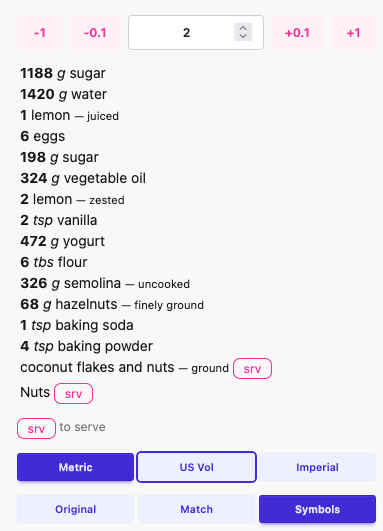
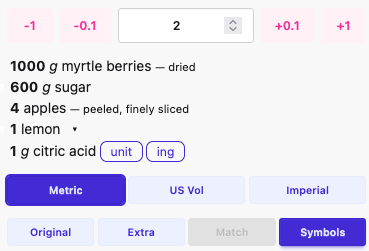
Each ingredient line is analysed by the system and split into:
- Quantity (bold)
- Unit (italic)
- Ingredient (regular)
- Extra (muted, optional)
You'll also see small badges for parser “flags”:
~approxoptoptionalsrvto-servettto-taste
Instructions/states (e.g. “finely chopped”, “lukewarm”, “rinsed”) are kept as a muted tail after the ingredient. Inline alternatives that are ingredient-only appear on the same line separated by |; quantity/unit alternatives live behind a chevron.
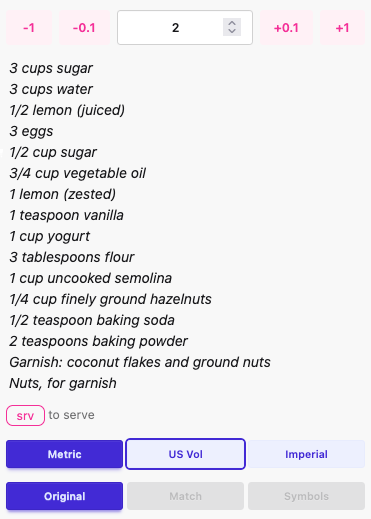
Original Ingredient
Parsed Ingredient
Ingredient Headings
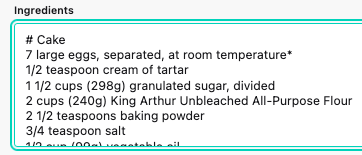
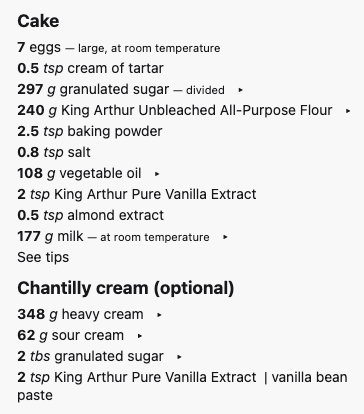
You can add section headings to ingredients using markdown-style hash prefixes at the start of a line:
#for a large heading##for a medium heading###(and more hashes) for smaller headings
This is useful for grouping ingredients, for example ## Sauce or ## Toppings.
Heading Input (Markdown)
Heading Rendered
Literal HTML heading tags (for example <h2>Sauce</h2>) are no longer supported in ingredient lines. Use markdown hashes instead.
Quick pattern summary
tldr; Here are the common ingredient patterns the parser recognises.
- Quantities: whole numbers, decimals, fractions (including unicode), and ranges (
1-2,1 to 2,¼-½). - Written numbers:
one,five,twenty-one,a(treated as 1). - Units: standard units + abbreviations (
tbsp,tbs.,kg,c,fl oz, etc.) and common food units (clove, stick, pinch, bunch, pack, can). - Flags:
optional,to taste,to serve, andapprox(e.g.about,approx.,~,roughly). - Instructions: preparation/state words are kept as muted instructions (e.g.
finely chopped,lukewarm,peeled,freshly ground). - Extras: comma/bracket notes are pulled into the extra tail, with nested brackets supported.
- Alternatives: ingredient-only alternatives stay inline (
black pepper | white pepper), quantity/unit alternatives go behind a chevron. - Multipliers:
2 x 150 gor3x250mlmultiply the quantity and show per-item amounts. - Size notes: sizes like
1-inch,3-inch, orlargeare preserved without breaking the ingredient.
Quantity
tldr; scale your recipe, with a variety of formats!
This can be:
A number/decimal or range with an optional fraction and unit joined, or with a space. e.g.
- 4 vanilla beans (number) => 4 vanilla beans
- 4.5 vanilla beans (decimal) => 4.5 vanilla beans
- 4-5 vanilla beans (range) => 4-5 vanilla beans
- 1 tsp vanilla essence (attached fraction) => 1 teaspoon vanilla essence
- 1 ½ tbsp vanilla essence (spaced fraction) => 1.5 tablespoons vanilla essence
The parser will normalise any fractions to decimals e.g.
1½ and 1 ½ will become 1.5.
The parser will attempt process any ranges in the ingredient line as well, e.g. 4-5 vanilla beans.
"What's the point in all this?" I hear you say! When we identify the numbers, we can run calculations with them, e.g. scale recipes.
Units
Units of measurement, e.g.
- gram
- ounce
- pint
- cup
If you want to dig under the hood, have a look at the lang.eng.js file from the parser module.
const units = {
    ...
    bottle: ['bottle', 'btl', 'btl.'],
    container: ['container', 'cont', 'cont.'],
    cup: ['cup', 'c', 'c.'],
    kilogram: ['kilogram', 'kg', 'kg.'],
    stick: ['stick', 'sticks'],
    tablespoon: ['tablespoon', 'tbs', 'tbsp', 'tbspn', 'tbs.', 'tbsp.', 'tbspn.'],
    ...
}
We're basically looking for units like can, cup, stick, then normalising them with a standard unit, e.g.
- 1 btl milk => 1 bottle milk.
- 1 kg sugar => 1 kilogram sugar.
The idea being, if we know what to expect in the ingredients, they're easier to read and manipulate.
Plurals
When the quantity is over 1, the units will return as plural, e.g.
- 1 tsp sugar => 1 teaspoon sugar
- 2 tsp sugar => 2 teaspoons sugar
Unit systems and symbols
The parser tags each unit with a system (metric, imperial, americanVolumetric) and supplies a symbol when one is available (e.g. g, oz, c). The UI shows a legend for the detected systems and lets you switch between Metric / US Vol / Imperial. teaspoons/tablespoons are treated as system-neutral and don’t force a system choice.
Languages
tldr; change your default language in the user settings.
Currently Supported:
- English
- German
- Italian
- Spanish
- French
- Portuguese
- Indonesian
- Hindi
- Russian
- Arabic
- Hungarian
- Czech
Obviously, different units and even numbers look different depending on your native tongue.
- 1.5 kilogram potatoes in German => 1,5 Kilogramm Kartoffeln
The above ingredients need to be interpreted differently, depending on what language they're in.
In our user options, we need to set the language to the one closest to our mother tongue, or turn off parsing altogether (check Display Original in the settings, or individual recipe).
If your native language isn't supported, hit me up with an issue and I'll try to get it added asap.
Have a look at this demo for an example of language switching:
Ingredient and Extra
tldr; the bit that goes after the ingredient, hidden by default.
I'll talk about these together, as they're intrinsically related.
A common pattern of recipes is to include any instructions or specifics after the recipe in brackets, or separated by one or more commas, e.g.
- 1 cup of sugar, granulated => 1 cup sugar | granulated
- 1 cup of sugar, granulated, caster is fine. => 1 cup sugar | granulated, caster is fine.
- 200g flour (sifted) => 200 grams flour | sifted
You'll also notice that the "of" has been removed, yep, it's doing that. All in the interest of brevity = readability.
By default, the Extra is hidden, to allow for a clean ingredients list. You can change the default setting in the user options section.
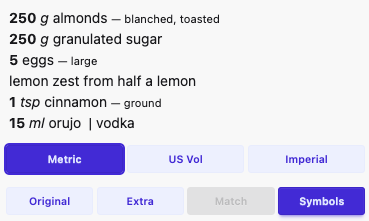
Click on the Extra button to show the extra instructions:
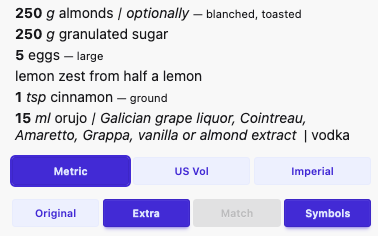
Instructions vs Extras
The parser actively pulls instruction/state words into instructions and removes them from ingredient/additional (e.g. “lukewarm” won’t leave stray “luke”). New tidy-up stopwords keep filler like “and/or” from cluttering extras.
Alternatives
Used to display optional inline ingredients. This can get very messy, so doesn't work super well on complex strings, Clean Ingredients is your friend, it should tidy things up a bit.
- Ingredient-only alternatives stay inline:
black pepper | white pepper. - Quantity/unit alternatives appear in the dropdown panel with small badges:
ingwhen an alternative ingredient is providedunitwhen an alternative quantity/unit/system is provided- Parenthetical or slash alternatives are captured without leaking units into the primary ingredient.
Original
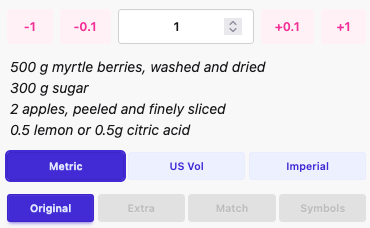
Alternative Hidden
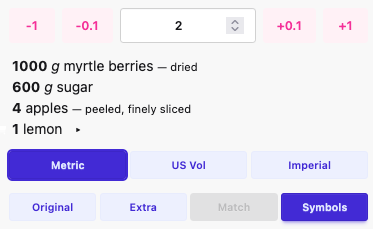
Alternative Shown
Scaling should work on the alternative ingredient.
Parsing Errors
If your ingredients are looking a bit wonky, then this is likely the cause of it. Our parser doesn't like:
- Ingredient separated from unit by comma
- ❌ "1 teaspoon, sugar"
- ✅ "1 teaspoon sugar"
- Double brackets
- ❌ "1 cup water (bottled water is great, pond water is best (muddier the better))"
- ✅ "1 cup water (bottled water is great, pond water is best, muddier the better)"
- Multiple units or quantities
- ❌ "2 13.5 ounce cans full-fat coconut milk"
- ✅ "2 cans full-fat coconut milk (13.5 ounces)"
- ✅ "2 cans full-fat coconut milk, 13.5 ounces"
I'll try to add to more of these (or fix the parsing error) as and when they come up.
If it's truly borked and you don't want to edit the recipe, just check Display Original.
Conversion
tldr; Set your default measurement system in the settings, or change it in the dropdown below the ingredients. Metric, imperial are supported well, US Cups/Volumetric is supported, kind of.
At the bottom of the ingredients section is a rather nifty feature, ingredient conversion.
Weight and volumes of liquid are easy enough to convert from one system to another as they involve relatively simple calculations. US Volumetric is it's own headache for most of us non-American users. So many of the internet's recipes use this, so I wanted to find a way to convert them. It turns out to be non-trivial, but it's working, kinda.
-
US Cups to Metric - Measurement Dropdown
-
1 cup vegetable oil => 216 grams vegetable oil | Vegetable oil (216 g/cup)
That last bit isn't the extra, but the Cup Match - unchecked by default, I've included it so folks can feel reassured that they're not adding an incorrect match to their baking recipe.
"How do you perform this feat of conjuring"? I hear you ask!
First we figure out the measurement system from the units contained within the ingredients.
- grams + kilograms + litres => Metric
- pounds + ounces + fluid ounces => Imperial
- cups => US Cups
If they're mixed, it'll try and get the system by counting the instances of each one belonging to whatever category, e.g. grams 2, cups 1 => metric. If they're equal, it'll get a bit confused. They shouldn't be there anyway, so take them out!
Note, teaspoons/tablespoons is system agnostic, as many folks use them for smaller ingredient quantities in recipes. However, if the system is found to be US Cups, it will attempt to convert them to grams. You can prevent this behaviour by checking Use teaspoons and tablespoons instead of grams. in the user settings.
Once we have a Measurement System, we can work out what conversion to do. Select the system you want to use in the dropdown (or select a default in the user options), and watch Vanilla perform its magic.
What we have is a big list of ingredients, and their approximate volumetric weight in grams, we can use this to run the conversion. It'll help if the ingredient is as simple as possible to run this. If it fails, it'll use the default weight, which is the cup weight of water, or 237g, you'll see an asterisk.
- 1 cup Madagascan weeping bee honey => 237 grams Madagascan weeping bee honey *
-
1 cup honey => 336 grams honey | Honey (336 g/cup)
-
Converted using default water density
Per-item quantities and multipliers
If a line has a multiplier (e.g. 6 x 50 g patties), the main quantity remains as entered, and a muted tail shows the per-item amount (per item: 50 g).
As you can see the longer honey ingredient failed. If you want it to work better, just move the extra bit to after a comma or in brackets:
- 1 cup honey, Madagascan weeping bee => 336 grams honey | Madagascan weeping bee | Honey (336 g/cup)
Advanced: Ingredient Matching Configuration
The conversion feature uses fuzzy matching (Fuse.js) to find ingredients in the density database. The defaults work well for most cases, but advanced users can fine-tune the matching behaviour via environment variables.
| Variable | Default | Description |
|---|---|---|
FUSE_THRESHOLD_STRICT |
0.3 |
Threshold for strict matching (0.0 = perfect match, 1.0 = match anything). Lower = stricter. |
FUSE_THRESHOLD_RELAXED |
0.5 |
Threshold for relaxed matching on individual words (e.g. "yellow onions" → "onions"). |
FUSE_MIN_WORD_LENGTH |
3 |
Minimum word length to attempt matching (prevents matching "of", "in", etc.). |
FUSE_DISTANCE |
100 |
How far from the start of text a match can be. Lower = matches must be near the beginning. |
FUSE_MIN_MATCH_CHAR_LENGTH |
2 |
Minimum characters that must match for a valid result. |
These are optional overrides - only set them if you're experiencing matching issues and understand Fuse.js parameters.